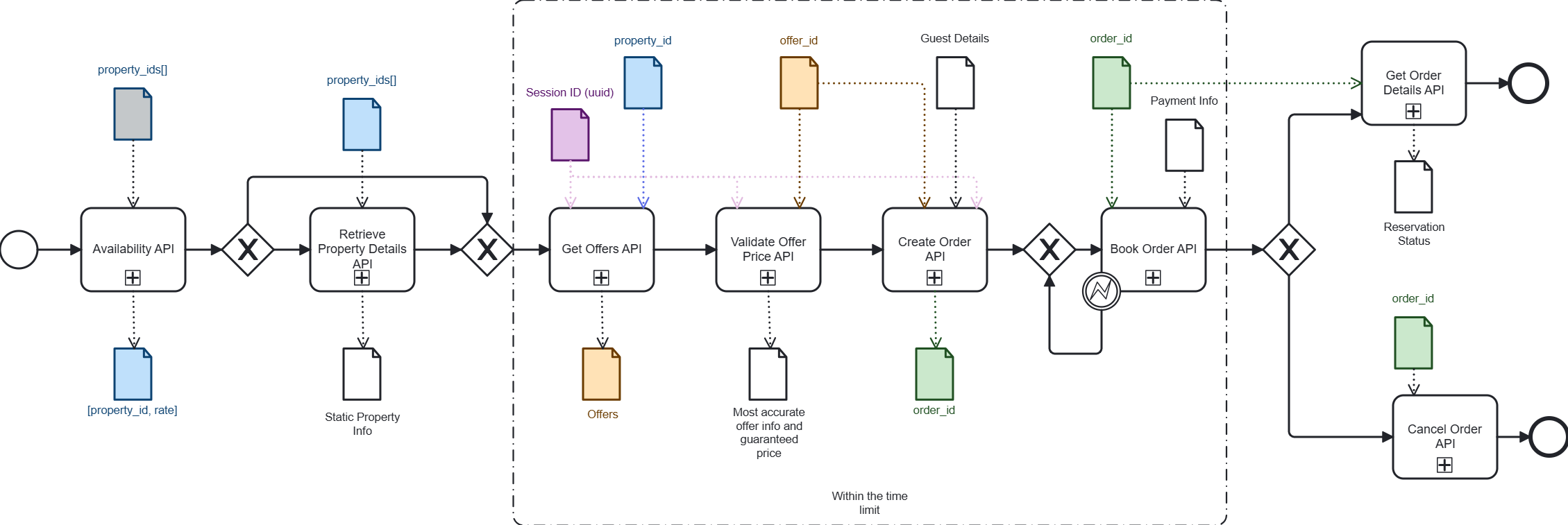
Workflow: Property Booking Process
-
Initiate Search: Begin by using the Check Availability method by radius/rectangle or a list of property IDs to receive a list of available properties matching the criteria. Optionally pass
session_idgenerated on your side to save search parameters for the Get Offers method. -
Retrieve Property Details (Optional): Use the
property_idwith the Retrieve Property Details method to access detailed property information. This step is optional but provides static property information (descriptions, policies, images, etc.) -
Get Offer ID: Call the Get Offers API with mandatory fields
property_idandsession_idto retrieve anoffer_id. This returns pricing options for payment methods. Contact product support at [email protected] for help selecting the best option. -
Validate Offer: Use the Validate Offer Price API with the
offer_idto get accurate pricing, cancellation policies, and aroom_id. Prices from the Get Offers API may not be final. -
Create Order: Call the Create Order API with the
session_idandproperty_idfrom step 3, plus theoffer_idandroom_idfrom step 4. A successful response returns a neworder_id. -
Book Order: Use the Book Order method with the
order_idfrom step 5 to complete the booking with the supplier. This asynchronous process returns a successful response when the booking request is received, changing the room status toprocessing_booking. Use Get Order Details method to track status change tobooked. -
Monitor Booking Status: Regularly check the booking status and payment details using the Get Order Details method.